
Names copied by hand, unreadable entries, no photo, no ID — and nobody can say who is still inside.
Prepared for  SHIMIZU CORPORATION INDIA PVT. LTD.
Today's Work, Tomorrow's Heritage
IndusTrack
Every employee, contract worker and visitor — who came in, who is inside right now, who left, and who gets paid. One system for the gate, the shop floor and HR.
- Employees · contractors · visitors
- Face · finger · card · QR
- Live headcount on any TV
- Attendance, payroll & contractor bills
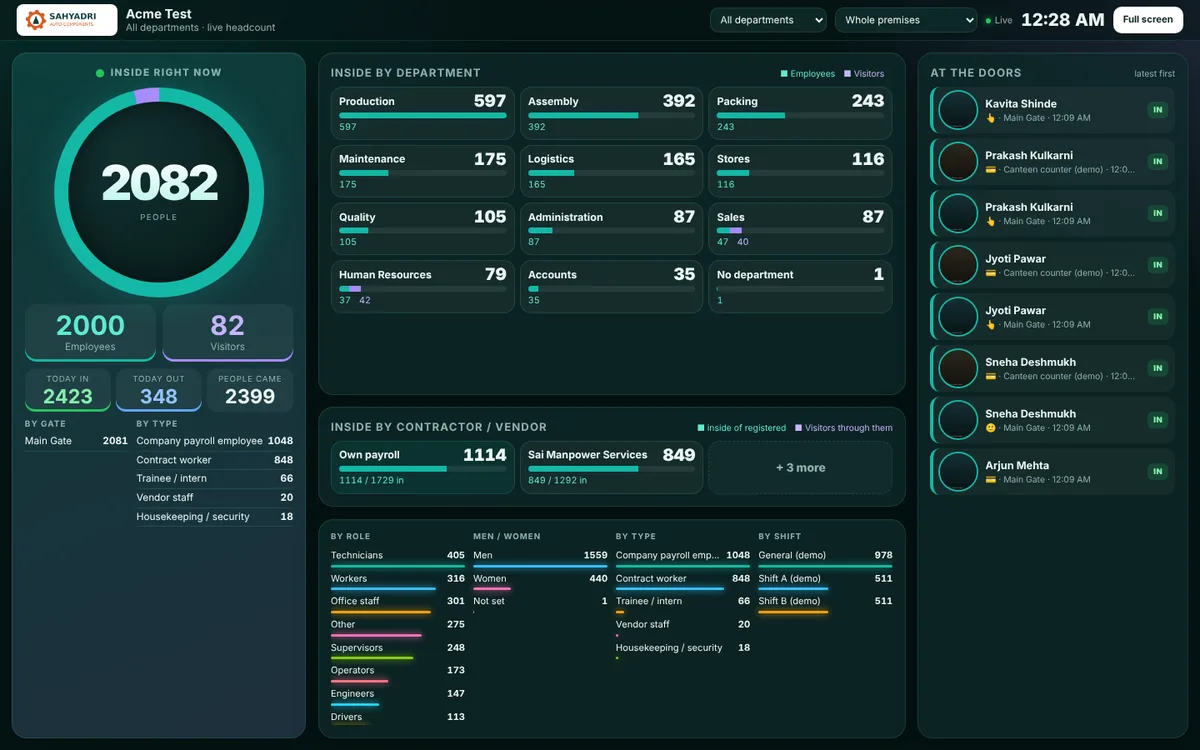
Live headcount10:42
2,082inside now
2,000Workers
82Visitors
Today IN2,423
Today OUT341
Why change
The gate still runs on registers, spreadsheets and guesswork
Buddy punching, missed punches, manual muster rolls and overtime arguments every month.
Bills by headcount claimed, not by headcount present. Expired contracts still walking in.
During a fire drill: how many people are inside, which department, which visitors? Minutes lost counting.
IndusTrack answers all four from one source: every punch and every scan, as it happens.
One platform
Eight modules, one record of every person
Click a module to see what it does.
🪪 Employees & access
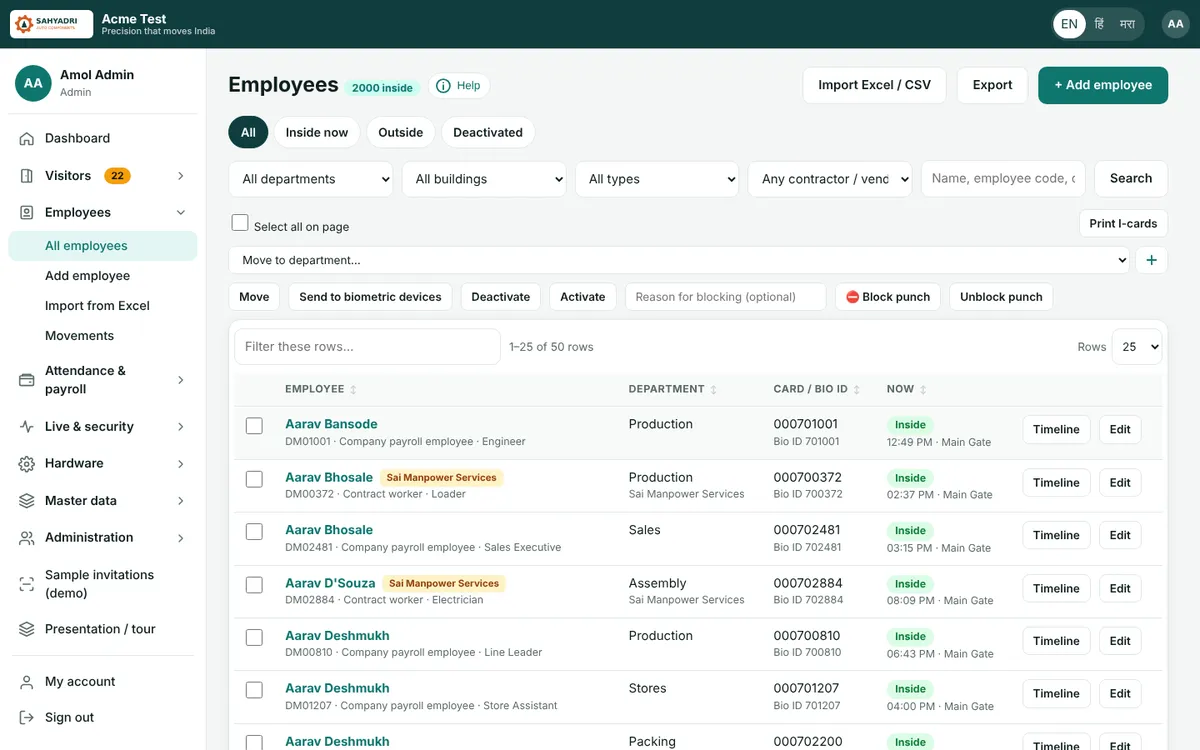
- One record per person: photo, discipline, designation, shift, subcontractor, vehicle, blood group, validity
- Enrol face, finger and card once — copied to every machine of the same brand
- Allowed gates and doors per person; exit always works
- Block a person’s punches everywhere in one click (with reason)
- Printable I-cards with photo and QR; Excel import / export
- Employee self-service: own attendance, shift timetable, leave, requests, payslips
🎫 Visitors
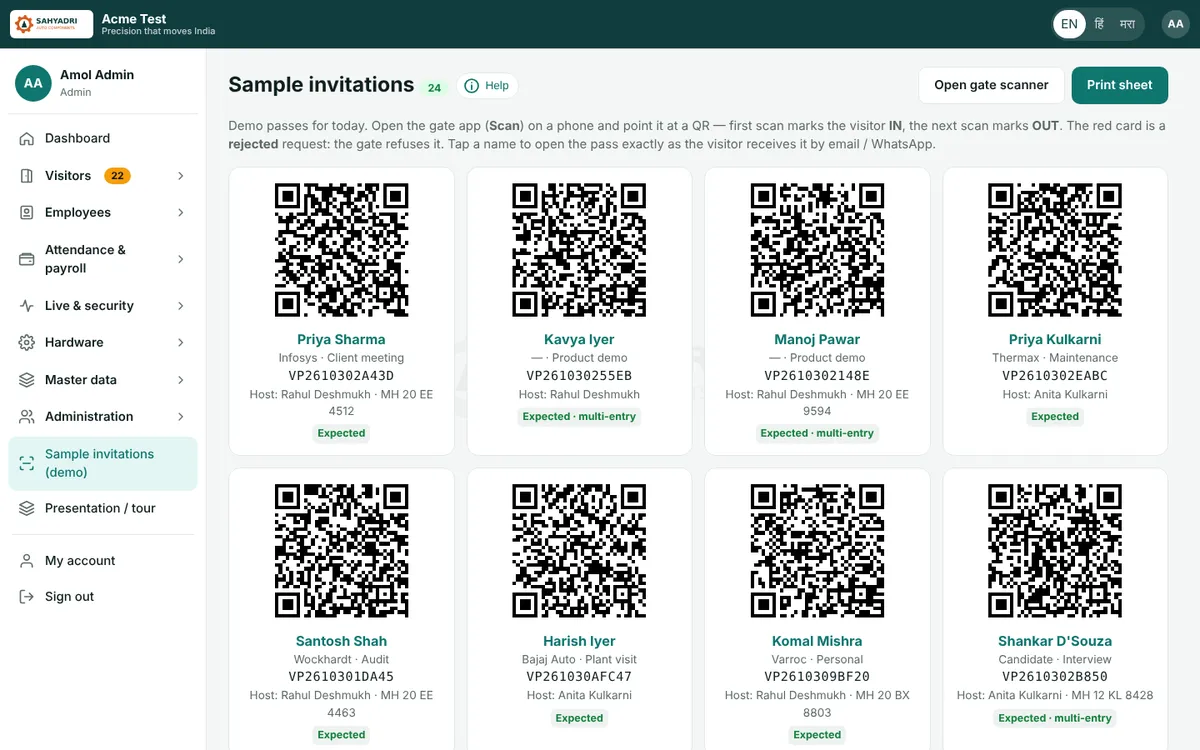
- Hosts request a pass from phone or web; visitors can also self-register
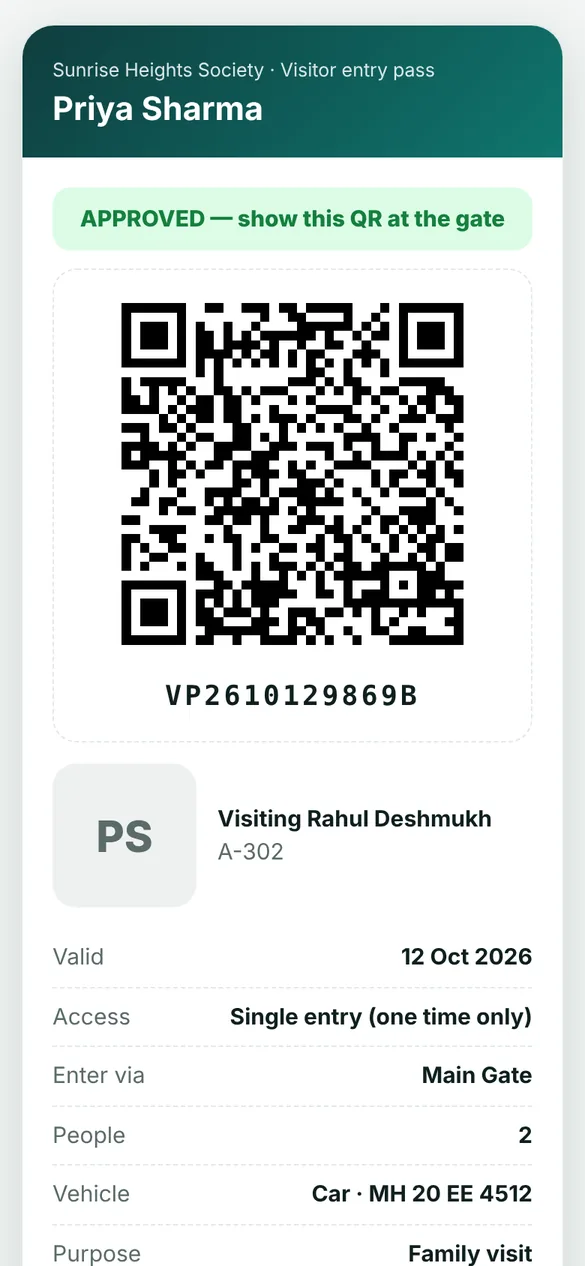
- Admin / department head approves; pass sent by email or WhatsApp with a QR
- Single entry, multiple entries or a date range; time window and allowed gates
- Vehicle number, people count, ID type and documents with every visit
- Guard app scans the QR — green IN, red with the reason, the gate stays shut
- Visitors counted under the person they meet; full in / out history
👷 Contractors & vendors
- Company payroll or contract worker — chosen per person
- Contract validity: when the contract ends the worker is refused at the gate
- Planned vs actual manpower per trade
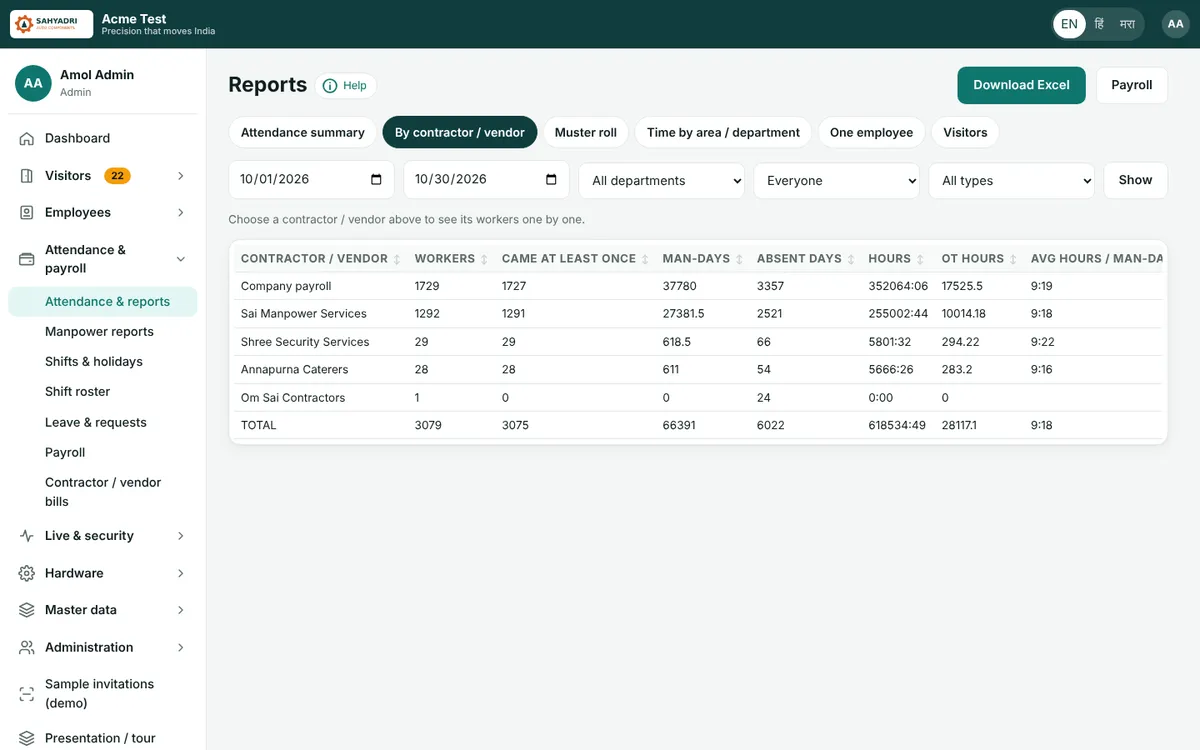
- Contractor-wise attendance, man-days and overtime
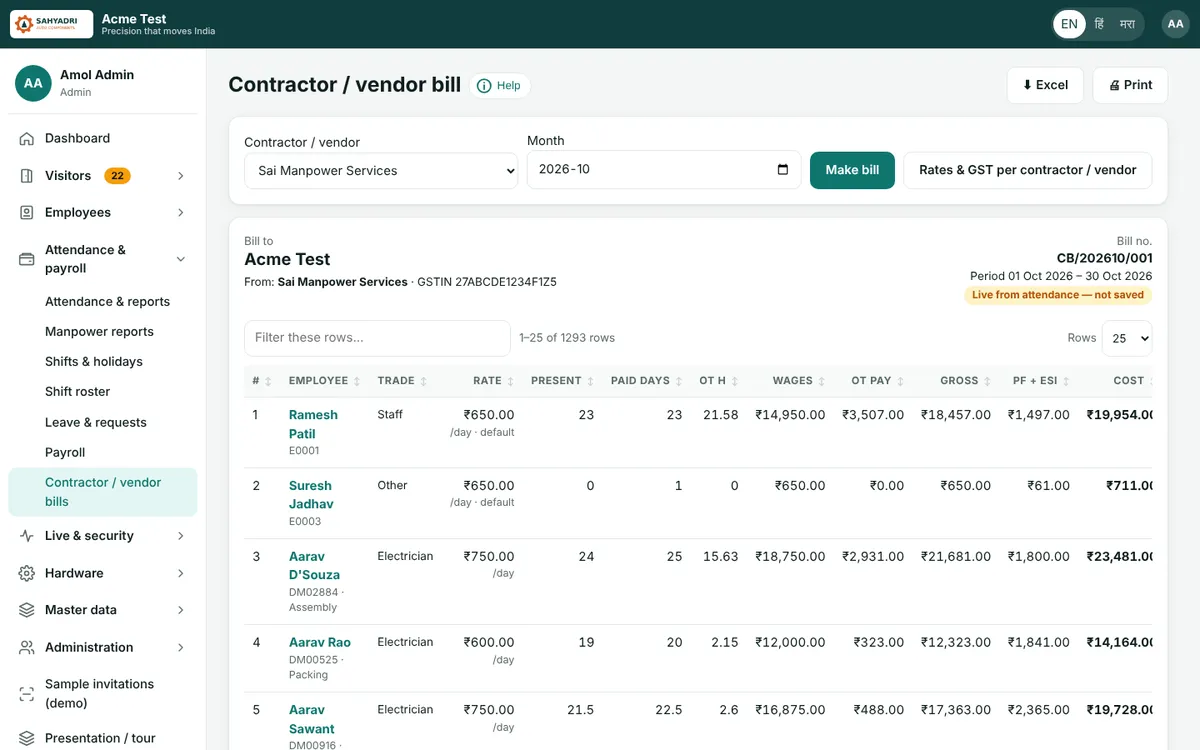
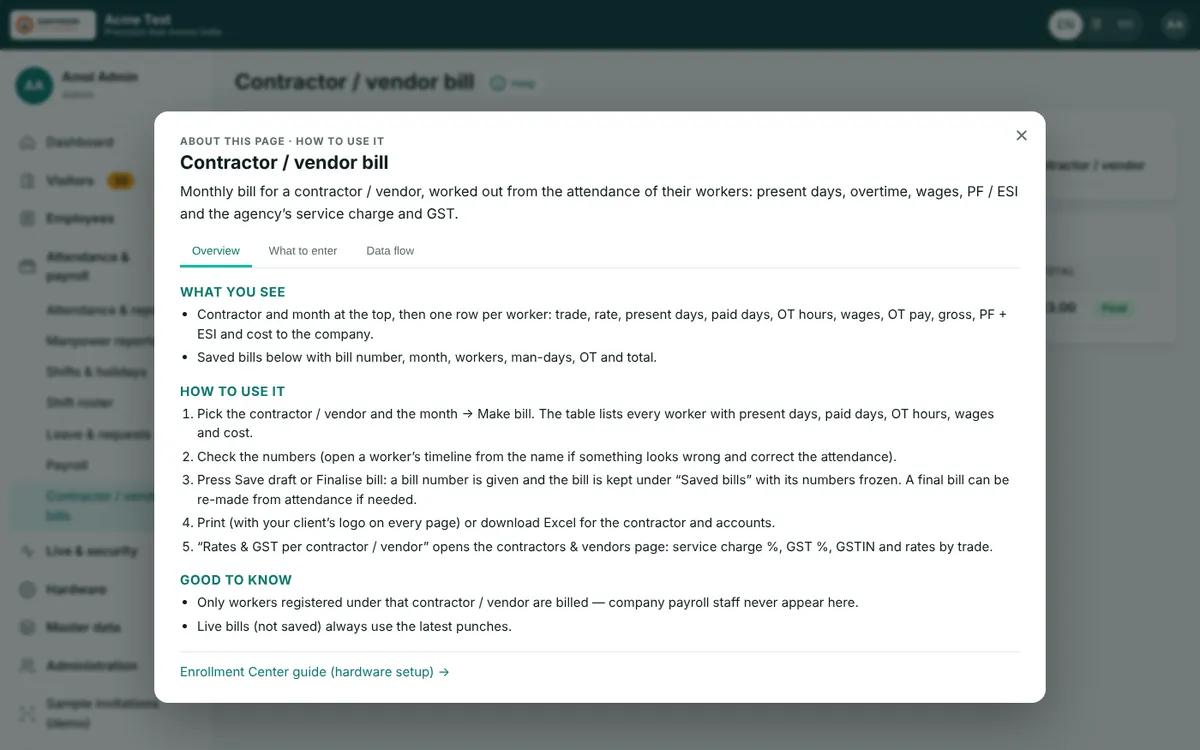
- Monthly contractor bill: wages, OT, PF / ESI, service charge, GST — draft and final
- Inside by contractor on the live headcount screen
💰 Attendance & payroll
- Shifts, rotating rosters, weekly offs, holidays, grace time
- Present / half day / absent / leave / OT computed automatically
- Muster roll per department or contractor, Excel export
- Monthly, daily or hourly pay with PF, ESI and PT
- Payslips, bank statement and statutory reports
- Corrections and leave approvals with an audit trail
📊 Live headcount & screens
- Inside now: employees + visitors, by department, contractor, gate, shift, role, gender
- Today’s total IN and OUT, people who came today
- Gate welcome display with photo, name and spoken greeting
- Department screens for department heads; roll call for fire drills
- Android TV / box app and Windows kiosk: start at power-on, self-healing
- Alarms (machine offline, PPE missing, sensors) on every screen
🔌 Hardware & Enrollment Center
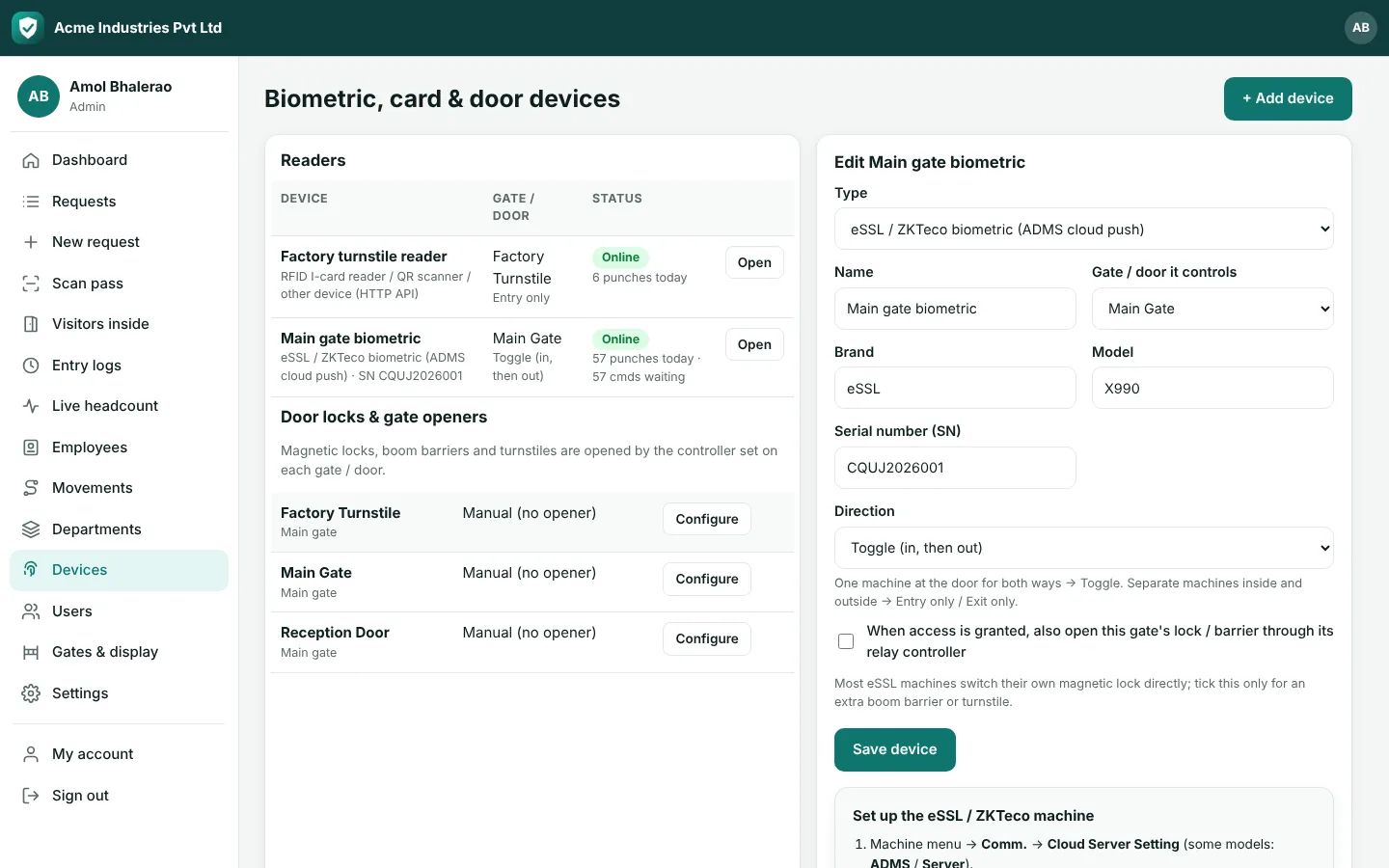
- Cloud (ADMS) machines connect straight to the website — any site, no PC needed
- Enrollment Center on an office PC drives LAN machines, doors and barriers
- Import existing machine users and fingerprints, matched by employee ID
- Repeat-punch lock, punch block and date / time pushed to every machine
- Turnstiles, flap barriers, boom barriers and magnetic locks open only for valid people
- Hardware status page: every device online / offline with alarms
🦺 Safety, cameras & vehicles
- Gate camera checks helmet and reflective vest at entry — alert or block
- Picture of the person / vehicle saved with each IN and OUT
- Camera wall for guards and department heads
- Vehicle register with number plate, colour and type
- Sensors: temperature, gas, smoke, power, solar — history and alarms
- Area mapping: who was in which zone and for how long
📑 Reports, audit & help
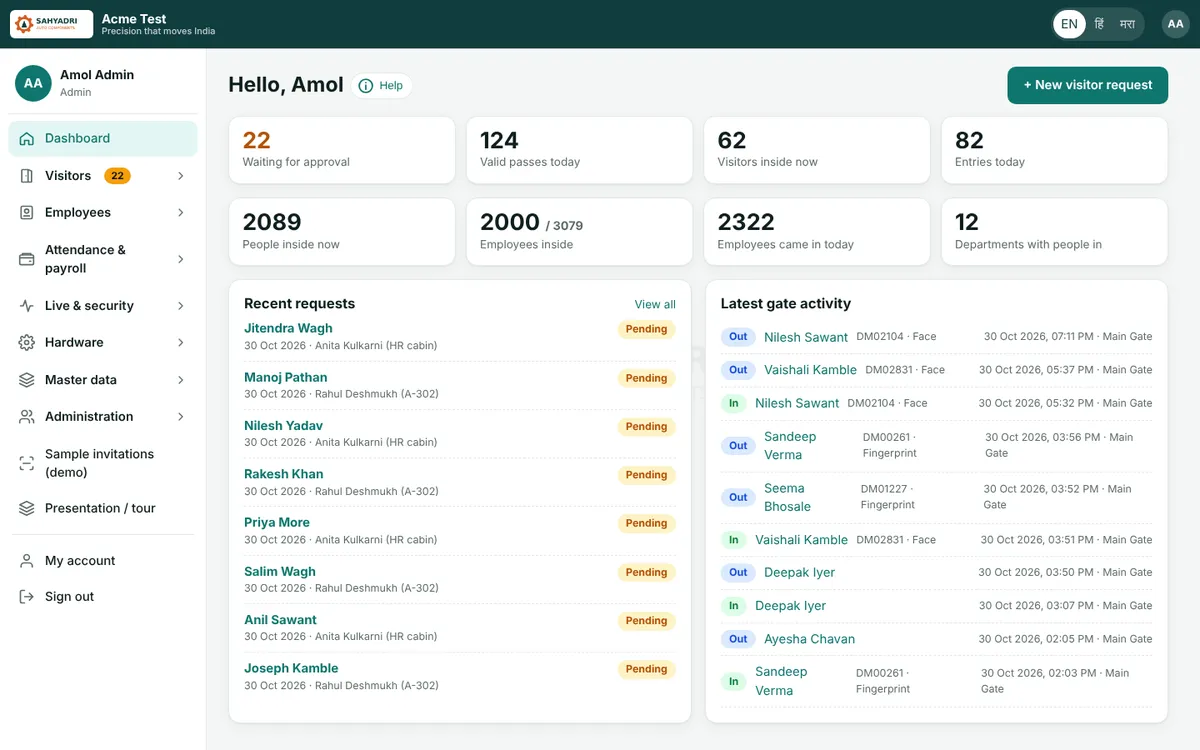
- Movements, entry logs, time by area / department, one-employee report
- Printouts carry your client’s logo and tagline on every page
- Audit log of approvals, corrections and settings
- English · हिंदी · मराठी interface
- Help on every page: how to use it, what to enter, where to find each key
- Demo mode with 3,000+ sample people for training
See it working
A day at the gate — press play
SV
Two journeys, one system
From joining to payslip — and from invitation to exit
- Register
Add or import from Excel; choose company payroll or contractor, department, shift, allowed gates.
- Enrol
Face, finger and card at the Enrollment Center or straight on the machine — sent to every machine.
- Punch
Gate, turnstile or door opens in a second. Blocked, expired or repeat punches are refused with the reason.
- Track
Live headcount, area time, canteen, movements and photos — today IN / OUT at a glance.
- Pay
Attendance, OT, payroll, payslips and the contractor’s monthly bill.
- Request
The host requests a pass: name, mobile, date, purpose, vehicle, ID photo — or the visitor registers.
- Approve
Admin or department head approves; rules for single, multiple or date-range entry and time windows.
- Pass
QR pass by email / WhatsApp; the visitor can add a photo and documents.
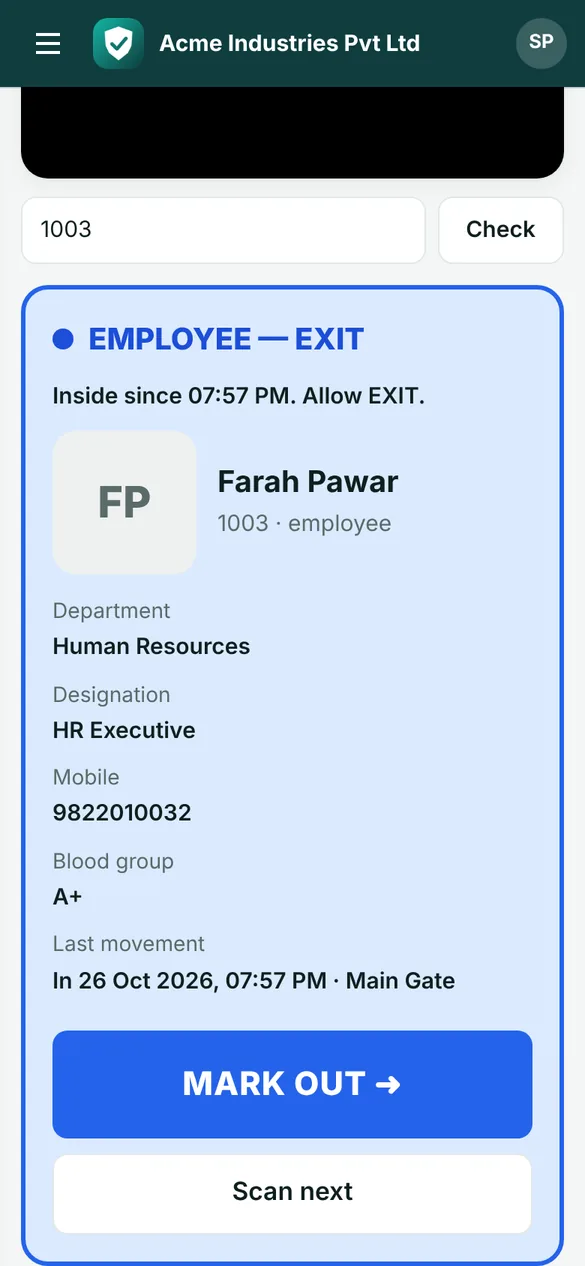
- Scan
Guard app or kiosk scans the QR — IN, with the host notified and the gate TV greeting.
- Exit
Another scan marks OUT; visit time, gate and guard saved for audit.
Screens that never sleep
Headcount and gate TVs — day and night, without anyone touching them
- Inside now by department and by contractor, today IN and OUT, by gate, shift, role and gender
- Gate welcome screen: photo, name, department, method — and the name spoken aloud
- Fits any TV without scrolling, from 32″ to video walls
- Android TV / box app and Windows kiosk: start at power-on, keep the screen awake, recover from network drops and frozen pages, refresh nightly
- Set up with a 6-letter screen code — no long links on a TV remote
Attendance → payroll → contractor bill
Pay for days actually worked
Contract workers’ punches become man-days and overtime; the contractor’s bill follows. Try the calculator:
PF 13% (incl. admin, on wages up to ₹15,000) + ESI 3.25% employer contribution; OT at 2× the hourly rate. Your own rules are set per contractor and per trade.
Works with what you have
Hardware that reacts to every punch
eSSL, ZKTeco and compatible — cloud (ADMS) or LAN. Existing users and fingerprints imported.
Open on a valid punch, stay shut for blocked, expired or repeat punches.
Magnetic locks and parking barriers through relays / ESP32 controllers.
USB and network readers, barcode guns, the Android guard app and an unattended QR kiosk.
Photo with every punch, camera wall, helmet / vest AI, number plates.
Temperature, gas, smoke, power, solar — with history and alarms.
Any TV with Android TV / box, Windows mini-PC, tablet or browser.
Android app for guards, hosts and employees; works on the web too.
Everyone sees what they need
Seven roles, one login each
People, contractors, approvals, payroll, bills, devices, settings, every report.
Own department’s people, headcount, attendance and visitor approvals.
Requests visitor passes, shares them, gets told when the guest arrives.
Scans passes and I-cards, marks IN / OUT, vehicles, safety checks, cameras.
Own attendance, shift, leave and requests, payslips, profile.
Welcome popups and spoken greetings at the entrance.
Live numbers for management, a department or an area.
Your data, your server
Secure by design
- Runs on your own hosting (PHP + MySQL) — data never leaves your account
- HTTPS, role-based access, per-device and per-screen keys, audit log
- Machines keep punches when the internet is down and send them later
- Doors and barriers are switched only from the office network
- Visitors’ ID documents visible only to the people who need them
- Daily backups (hosting) and Excel export of everything
1 sfrom punch to screen
3,000+people on one live screen
24 × 7self-healing TV screens
3languages: English · हिंदी · मराठी
Getting started
Live in days, not months
- Day 1 · Set up
Website on your hosting, your logo and name, departments, shifts, contractors.
- Day 2 · People
Import employees from Excel; import existing machine users and fingerprints.
- Day 3 · Gates
Connect machines, turnstiles, barriers and screens; enrol new faces and cards.
- Week 1 · Train
Guards, HR and department heads trained; help on every page.
- Month 1 · Pay
First attendance close, payroll and contractor bills from real punches.
Questions
Frequently asked
Can we keep our existing biometric machines?
Yes. eSSL / ZKTeco machines connect through the cloud (ADMS) setting or the Enrollment Center on an office PC, and existing users and fingerprints are imported and matched by employee ID.
What happens when the internet is down?
Machines store punches and send them when the connection is back; screens show “Reconnecting” and recover by themselves.
Do visitors need to install an app?
No. The pass is a link with a QR code sent by email or WhatsApp.
Can contractors see or dispute their bill?
The bill lists every worker with present days, OT and wages, and can be exported to Excel or printed on your letterhead.
How many people and gates can it handle?
Thousands of people and any number of gates, doors and screens; the live headcount stays on one screen.
Can it carry our company’s name and logo?
Yes — your logo and tagline on every page, screen and printout, with an optional watermark.
See it with your own people and gates
A live demo on your premises data takes 30 minutes.
📞 8830350465 · ✉️ hisofttechnology2016@gmail.com